
COMMERCIAL PRINTING TEMPLATES
Artwork for print must be at least 300 pixels per inch, in CMYK, and include bleed unless noted.
- After you submit an order, an FTP will appear on the confirmation page and in your confirmation
email. Please upload your artwork files to the FTP folder.
- To avoid delays or art modification fees, include
bleed. Bleed means your want your artwork to extend to the edge of the trimmed page,
so you must include a bleed in your artwork extending past the trim lines. If you don't include
a bleed, two of the four edges will have an amateur-looking white margin after cutting. Also, if
you put important words or art too close to the trim line, it may get cut off, so you should use
a safety margin of 1/8" or 3mm.
- If using PDF templates, send two files: one with template
lines showing, and one without. Here's a simple overview.
- We require PRINT-READY files (ie no transparency effects, export as PDF/X-1A for printing).
- If you have used transparency effects in Adobe Illustrator, use Objects → Flatten Transparency → High Resolution before exporting.
- Artwork for print must be a resolution of at least 300 pixels per inch and in CMYK.
- All paper print items require a bleed of 1/8" (approx 3mm) unless noted.
- Always leave a safety margin of 1/8" from the edge of the paper to important text or visuals -
otherwise there is a risk of it getting cut off.
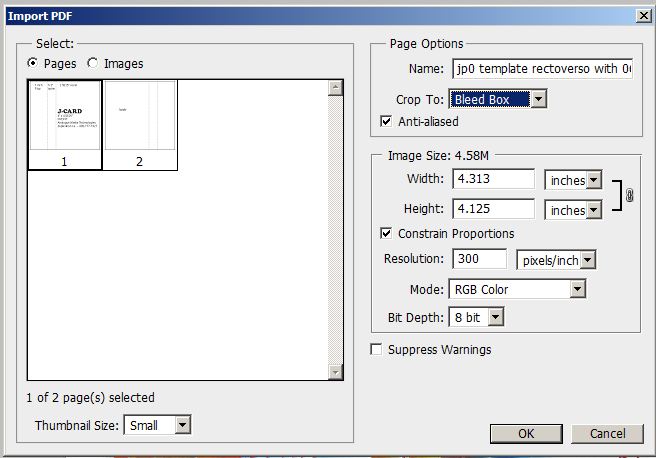
- Note for Photoshop users: When you import a PDF please
select 'Crop' to 'Bleed Box'.

- Make sure your resolution is set to 300 pixels per inch.
- Place your artwork in a separate layer.
- We can customize your print project to your liking! Our
printing press is capable of adding effects such as embossing, lamination, color foil,
debossing, pantone matching, and more! Take a look
at our gallery, and don't hesitate to email
us with any questions.
×