
When you order printed CD wallets or Digipak, your beautiful and meticulously designed artwork will naturally appear on the outside and inside of the package. However, because in the manufacturing process the printed area doesn’t extend into every part of the folding and gluing construction, there is often a small vertical white area on the inside spine. This can be avoided with inside print, and it’s now an easy to choose option on our CD pressing pages!
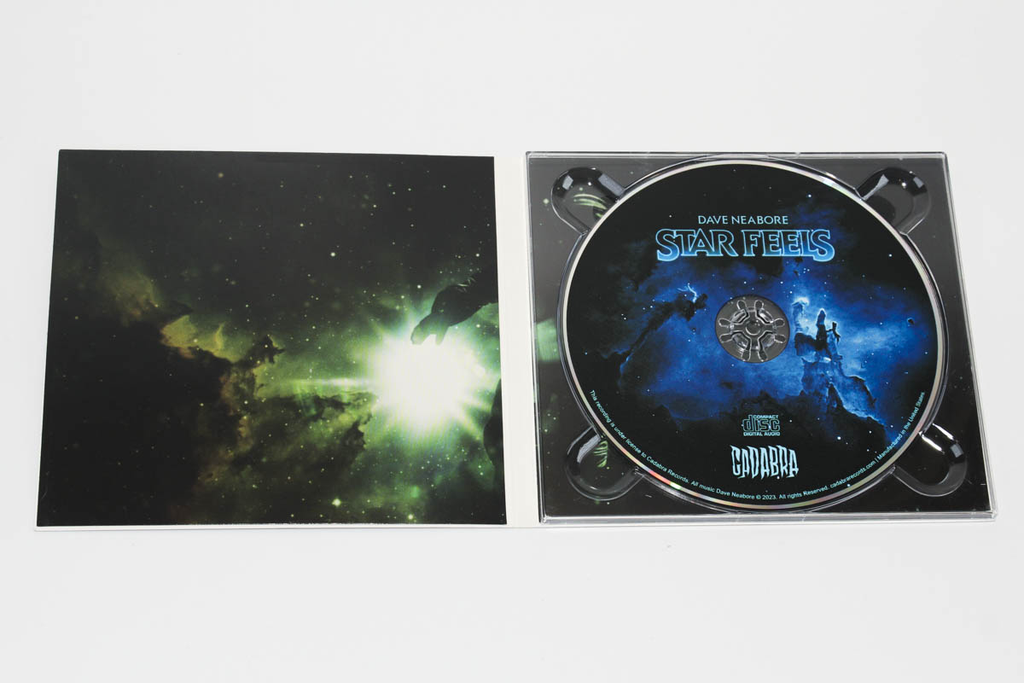
So what we have above is the default Digipak printing method, with no inside print selected. You can see the strip of white that interrupts the left and right interior panels.

Here is our first print option: black inside print. This is a great budget-friendly way to get a black fill to compliment your dark interior artwork. Since the inside print area is on an uncoated board, you will notice the black is a bit duller than the coated print of the inside panels.

The second option is a CMYK inside print. This can be used to extend your artwork with no interruption between interior panels, or to create a funky divider in the spine area. Like the black print above, keep in mind that the uncoated area yields a duller print color with some tactile texture.